Discovering the Google Notification Phishing Exploit
I received an email in my inbox that, at first glance, looked legitimate since it came from no-reply@accounts.google.com. But it looked suspicious when it asked me to call a phone number to resolve a security issue. That single detail didn't fit, so I decided to dig into how this attack actually works.
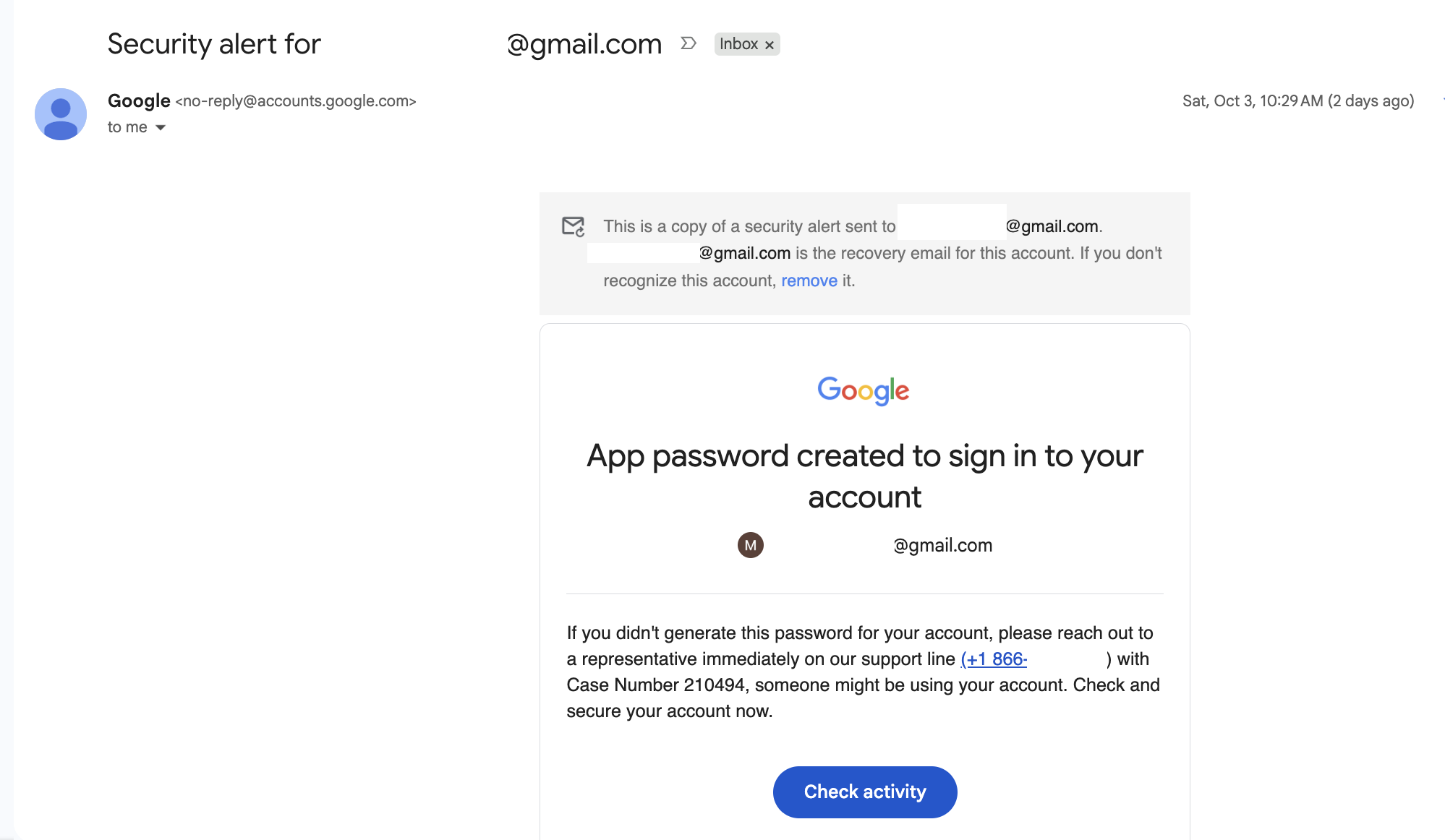
The first thing anyone checks when deciding if an email is a phishing attempt is the sender address. In this case, it showed as no-reply@accounts.google.com, which checks out: that's a real Google domain, and the email passes every authentication check a legitimate Google email would. So the obvious question became: how does an attacker get a genuine Google address to deliver their own message, phone number and all?
It turns out attackers are abusing legitimate Google Account features, specifically recovery contacts and App Passwords, to generate real security emails that carry attacker controlled text. Below is how the attack works, step by step.
Summary: Google Account Email Notification Phishing
A phishing technique currently making the rounds targets Gmail users by abusing two legitimate Google account security features: recovery contacts and app passwords. The messages originate from genuine Google infrastructure. Because the emails are sent by Google itself and not spoofed, they pass SPF, DKIM, and DMARC checks and arrive with full sender legitimacy, making them far more convincing than a typical phishing email.
This post breaks down how the attack works, why it's effective, and how to recognise and defend against it.
Step-by-Step Breakdown of the Google Phishing Attack Chain
Step 1: Attacker creates a throwaway Gmail account
Nothing unusual here. Just a free account the attacker controls, used purely as infrastructure for the rest of the chain.
Step 2: Adding the Target as a Google Recovery Contact
Using Google's recovery contacts feature, the attacker adds the victim's email address as a recovery contact on the throwaway account.
This immediately triggers a notification email to the victim, sent from Google's legitimate infrastructure, informing them that they've been added as a recovery contact. The email includes a 6 digit verification code as part of Google's normal recovery-contact setup flow, but this code is a red herring from a phishing standpoint. It's visible to the victim, but it's simply part of how Google confirms the recovery contact relationship. The attacker doesn't need it, and it plays no role in the phishing attempt itself. The relationship is established without the victim needing to take any action at all.
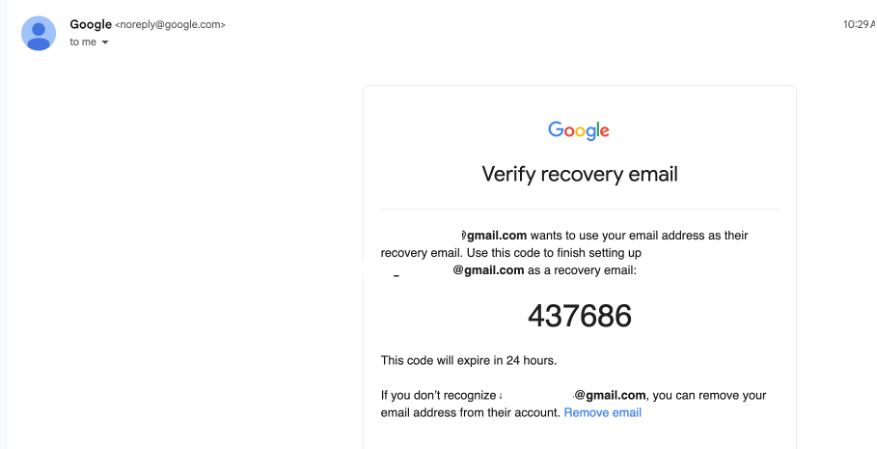
Why this step matters: it's not the phishing payload itself. It's a priming message: an unsolicited but entirely genuine-looking email from Google that gets the victim's attention and establishes sender credibility before the real payload arrives.
Step 3: Enabling 2-Step Verification on the Attacker Account
App passwords are only available to accounts that have 2-Step Verification turned on, so the attacker first adds a phone number at myaccount.google.com/two-step-verification/phone-numbers and enables 2-Step Verification. Without this, the app passwords option won't appear at all.
Step 4: Setting Up an Authenticator App to Unlock App Passwords
The attacker also configures an authenticator at myaccount.google.com/two-step-verification/authenticator. This is one time setup on the attacker's own throwaway account. It's housekeeping needed to unlock the app passwords feature, not something the victim sees or is involved in.
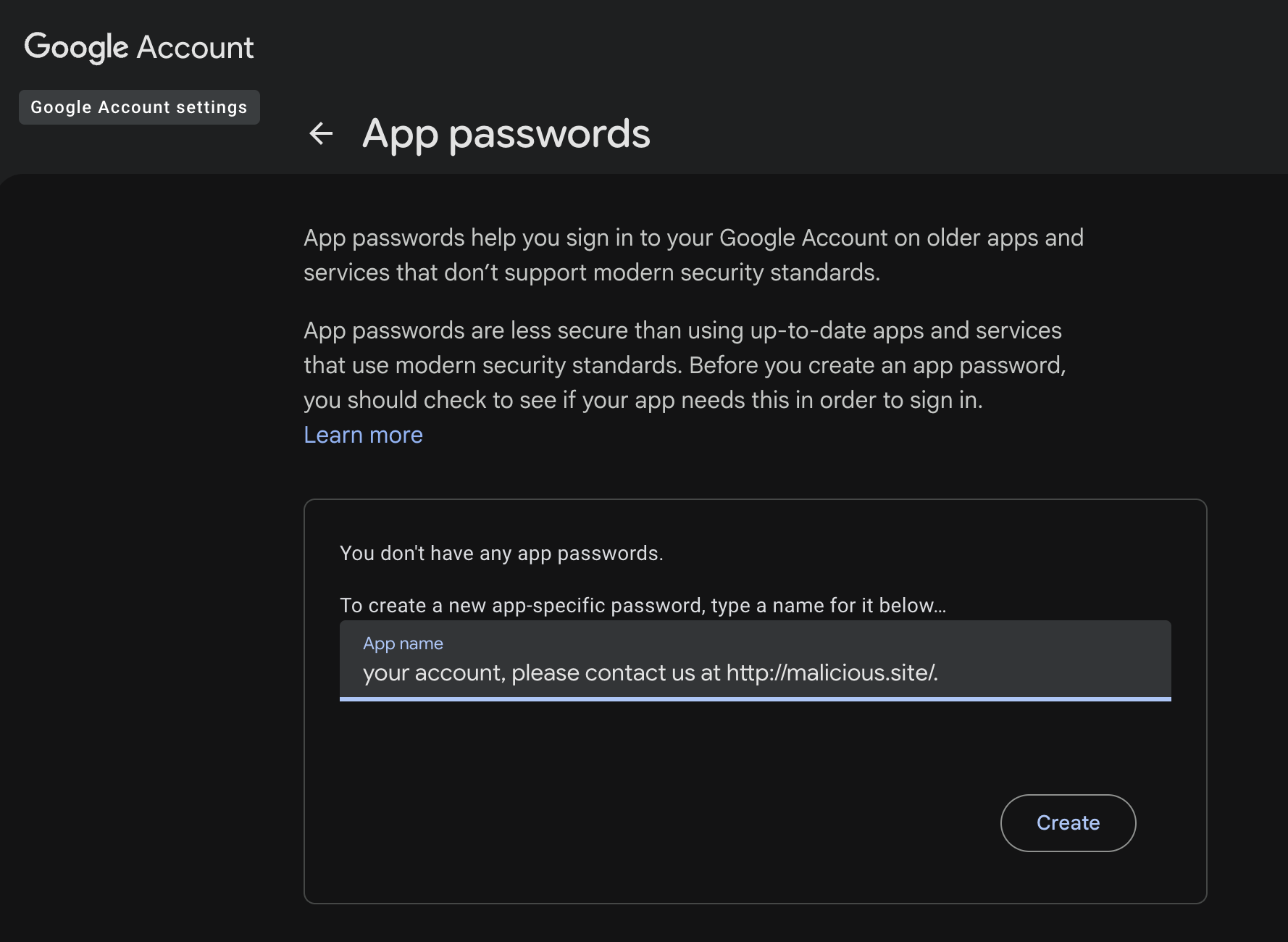
This is where the actual phishing happens. Using Google's app passwords feature, the attacker generates an app password for the throwaway account. Instead of entering a normal descriptive name like "Laptop Mail Client," they enter attacker controlled text designed to look like part of a security warning, for example:
your account, please contact us at http://malicious.site/
Google does not sanitise or restrict this free text field. Generating the app password triggers a second notification email, sent from no-reply@accounts.google.com with the subject line "Security alert", and the attacker's text is echoed verbatim into the real template, producing something like:
If you didn't generate this password for your account, please contact us at http://malicious.site, someone might be using your account., someone else might be using your account. Check and secure your account now.
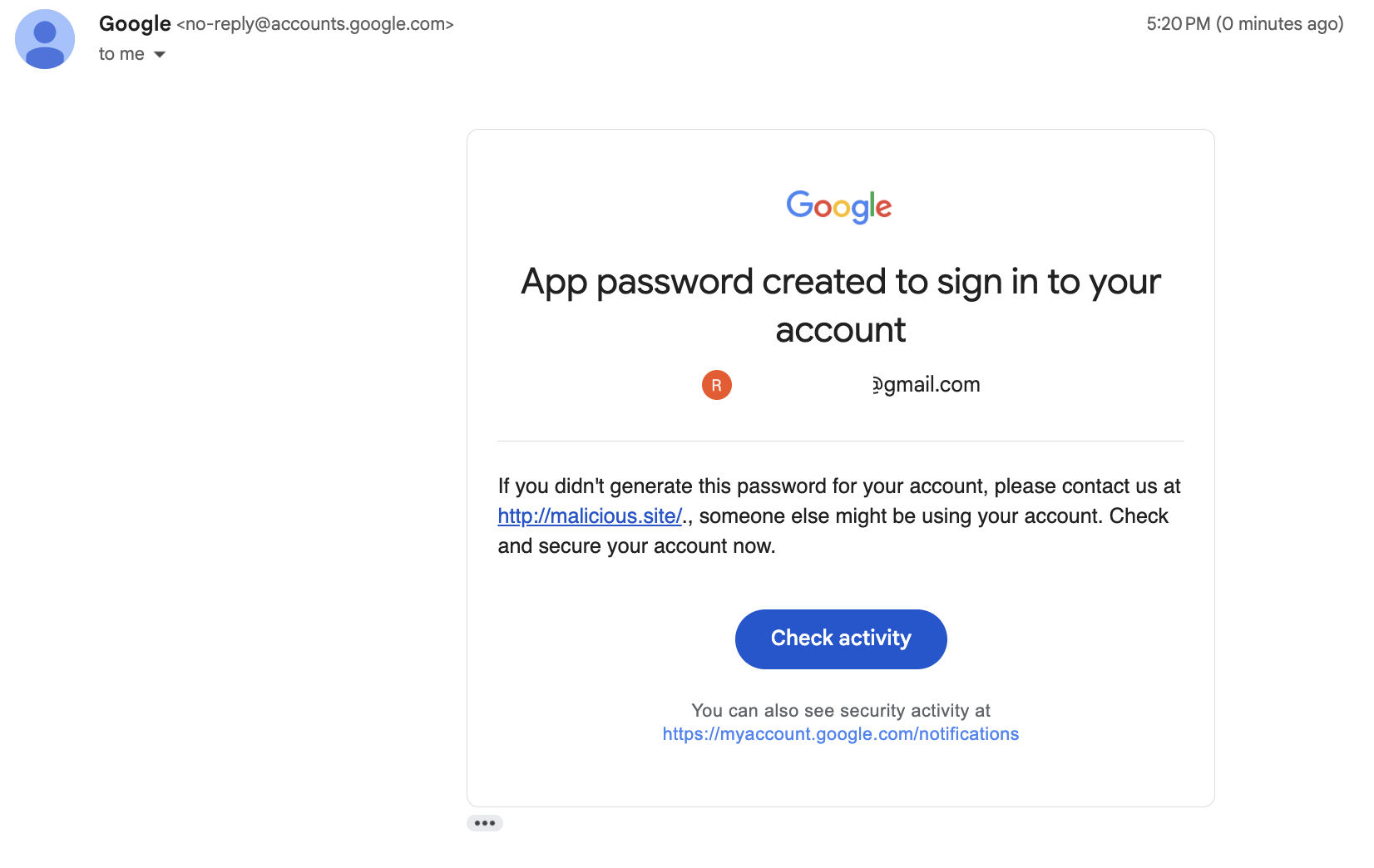
The attacker isn't forging this email. They're injecting their message into a genuine Google-authored template through a field Google never intended to be user-facing phishing copy. The result reads as a real, urgent Google security warning, complete with a call to action such as visiting a link or "securing your account now," baked into the attacker's chosen text.
Step 6: Executing the Tech Support Phone Call Scam
The app name field isn't limited to a URL. Variants of this attack use it to plant a phone number instead, often paired with something that looks like a reference or case ID, for example:
Your account was accessed from a new device. Call Google Support +1-800-XXX-XXXX, ref case #GL-2026-04821 to secure it.
Because this text lands inside a real "Security alert" email, the phone number inherits the same credibility as the rest of the message. A victim who calls it reaches the attacker, or a confederate, who can then run an ordinary tech support scam script: confirm the "case ID" to sound legitimate, walk the victim through "verifying" their identity, and ultimately talk them into reading out a 2FA code, installing remote access software, or navigating to a credential harvesting page. Some variants go further and have the attacker initiate the call themselves, using the recovery contact relationship and any other OSINT they've gathered to sound convincing when they claim to be "Google Account Security."
This turns a single email into the opening move of a live social engineering call. The email's job isn't to extract credentials directly; it's to get the victim to dial a number the attacker controls, where the real pressure and improvisation happens.
Why Google Email Abuse Phishing Is So Effective
- Genuine sender infrastructure. Both emails come from real Google sending domains and pass all standard authentication checks. There's no spoofed header, no lookalike domain, nothing for a mail filter or a technically savvy user to catch by inspecting the sender.
- Lands in the inbox, not Spam. Because the mail genuinely originates from Google's own mail servers and passes SPF, DKIM, and DMARC, Gmail and other providers have no authentication based reason to flag it. Spam filters mostly rely on sender reputation and authentication signals to make that call, and this technique satisfies both, so the message is treated the same as any other real Google notification and delivered straight to the inbox.
- No malicious link required in the email itself. The phishing content is entirely embedded in Google's own template text, not an external link added by the attacker. The example above uses a link, but the app name field could just as easily contain a phone number or other lure, since it's free text.
- Layered credibility. The recovery contact email primes the victim with a legitimate, if unsolicited, Google notification before the actual lure arrives, building a pattern of "Google has been emailing me about my account" before the urgent one lands.
- No account compromise required to send it. The attacker never touches the victim's account. Both emails are side effects of actions the attacker takes entirely within their own throwaway account. The 2-Step Verification and authenticator setup in steps 3 and 4 are just prerequisites Google imposes before the app passwords feature unlocks, invisible to the victim.
- Escalation path to a live scam call. A planted phone number and fake case ID give the attack a second stage. Once the victim calls, the attacker can improvise in real time, which is far more effective at extracting a 2FA code or remote access session than any static email text could be.
How to Detect and Defend Against Google Security Alert Phishing
- Google will never ask you to "contact us" at a generic IP lookup site, a phone number, or any destination embedded oddly in alert body text. Legitimate Google security alerts direct you to myaccount.google.com, not third-party contact info.
- Treat unsolicited recovery contact notifications as a signal, not a threat on their own. If you didn't ask to be anyone's recovery contact, you can remove yourself from that relationship at myaccount.google.com/u/2/recovery/email. This step alone doesn't put your account at risk, but it's worth watching for a follow up email afterward.
- Scrutinise "Security alert" emails for text that reads like it was grafted into the template. Oddly placed URLs, phone numbers, or run-on sentences that don't match Google's normal clean copy are a strong indicator the "app name" field has been abused.
- Never click through or call numbers embedded in alert text. Always navigate to myaccount.google.com directly to check security activity.
- A "case ID" or reference number proves nothing. Scammers include them precisely because they sound official. A real Google security alert email would never instruct you to quote a case number back over the phone. If you reach a human by calling a number from an email, assume you're talking to the attacker, not Google.
- Google does not make outbound calls about account security out of the blue. If you weren't the one who initiated contact through official channels, treat an unsolicited "Google Support" call as a scam, regardless of what they claim to already know about your account.
- Report the throwaway Gmail address and content to Google so the sending account can be actioned.
Conclusion: Guarding Against Trusted Platform Abuse
This isn't a vulnerability in the traditional sense. No systems are compromised, no code is exploited. It's a reminder that any free text field surfaced inside an authenticated, trusted notification template is a potential phishing vector, regardless of how legitimate the surrounding infrastructure is. Users are trained to trust emails from real Google domains, and attackers are increasingly exploiting that trust by finding the narrow seams where user controlled input leaks into otherwise trustworthy automated messages.
Protect Your Team with Phishing Simulation & Security Training
At Foregenix, we research and conduct social engineering attacks like the one described above. If you want to test and train your employees to recognise phishing attempts and see how they would actually respond to one, get in touch with us before a real attacker does it for you.
Keith Lee October 12, 2026
8 MIN READ